
Turbobit FAQ: Your Ultimate Guide to the Cloud Storage Giant
Turbobit FAQ
Turbobit is a popular name in the world of cloud storage and file-sharing, but what exactly is it, and how can you get the most out of it? Whether you’re a new user or a seasoned pro, you likely have questions. This comprehensive guide answers the most frequently asked questions about Turbobit, providing you with everything you need to know about its features, premium accounts, and troubleshooting.
What is Turbobit?
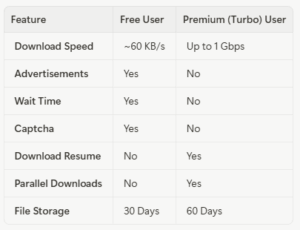
Turbobit is a cloud storage and file-sharing service that allows users to upload, store, and share files with others. It offers a fast and convenient way to exchange large files, with download speeds of up to 1 Gbps. You can upload files as large as 100 GB, and they will be stored for 30 days for free users and 60 days for premium users. One of the key advantages of Turbobit is that you can start uploading files with just one click, without the need for registration.
Free vs. Premium (Turbo Access)
Turbobit offers two tiers of service: a free plan and a premium plan called “Turbo Access.” While the free plan is a great way to get started, the premium plan unlocks a host of features that significantly enhance the user experience. Here’s a comparison of the two:
Top Frequently Asked Questions
Here are the answers to some of the most common questions about Turbobit:
What is Turbobit Premium Plus?
For users who need even more from their Turbobit account, there’s Premium Plus. This upgraded plan offers all the benefits of a standard premium account but doubles the annual traffic limit from 3,600 GB to 7,200 GB. The daily download limit is also increased from 40 GB to 50 GB, making it ideal for heavy users.
How do I cancel my Turbobit subscription?
Canceling your Turbobit subscription is a straightforward process, but the method depends on how you initially paid. There are separate cancellation links for payments made via mobile, credit card, and the “Authorize.se” billing service. You can find the correct link on the official Turbobit help page.
Why does it say “File Not Found”?
Encountering a “File Not Found” error can be frustrating, but it usually means one of three things: the file was deleted by the person who uploaded it, the file was removed due to a copyright violation, or the file’s storage period has expired. In any of these cases, the file is no longer available on Turbobit’s servers.
Troubleshooting Common Issues
How can I improve my security and download speed?
For enhanced security and privacy, it is highly recommended to use a Virtual Private Network (VPN) when downloading files from Turbobit. A VPN can also help you avoid potential speed throttling from your internet service provider (ISP), which can lead to faster and more stable downloads.
What should I do if my download is interrupted?
If you’re a free user and your download is interrupted, you’ll unfortunately have to start over from the beginning. Premium users, however, can resume interrupted downloads without losing their progress. If you’re experiencing frequent interruptions, try clearing your browser’s cache and cookies, using a different browser, or using a download manager like JDownloader.
Turbobit is a powerful and versatile file-sharing platform that caters to a wide range of users. By understanding the differences between the free and premium plans and knowing how to troubleshoot common issues, you can make the most of your Turbobit experience. Whether you’re sharing large files with colleagues or downloading content for personal use, Turbobit offers a reliable and efficient solution.
Turbobit FAQ